MS (Monitoring System)
MIB Product Management System
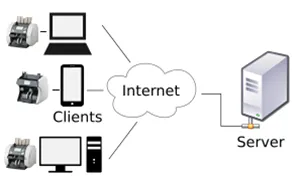
Overview
MS is a PC program, designed to connect one or multiple banknote counting machines.
Key Features
- Reading/Setting multiple machines' settings
- Saving/Searching multiple machines' counting log
- Saving/Searching multiple machines' OCR (banknotes' serial number) log
- Upgrading multiple machines (Remote upgrading is possible if MS is connected to the external network a.k.a internet)
Specifications
| Type | PC Software |
| Connection | Local network / Internet |
| Functions | Settings, Counting Logs, OCR Logs, Remote Upgrade |
| Status | Available |
Details
Reading/Setting Multiple Machines' Settings
Settings of the machines need to be monitored by the managers, maintenance service providers or government.
At MS, a user can read settings of multiple machines and change them simultaneously.
Saving/Searching Multiple Machines' Counting Log
The counting log is saved at MS. And users can search a specific event from the saved log.
Saving/Searching Multiple Machines' OCR Log
Same as counting log, the OCR (banknotes' serial numbers) log is saved at MS. And users can search specific banknotes with a designated serial number from the saved log.
Upgrading Multiple Machines (and Remote Upgrading)
With MS, there is no need to visit each machine with a USB stick for upgrades.
All machines registered in MS can be upgraded directly from the application.
If MS has access to the internet, remote upgrading is also possible — eliminating the need to visit each bank branch for software updates.
This significantly reduces maintenance costs for both banks and service providers.
Get Started
MS is available now. Contact your local dealer or reach out to us at team_sales@hyundaimib.com to learn more about integrating MS into your operations.